QuizScreen: Block Distracting Apps Until You Answer a Quiz Correctly

The iOS focus app that uses Apple Screen Time to block apps you choose. Unlock them by answering quiz questions—perfect for students, remote workers, and anyone building better digital habits.

Works with iPhone Screen Time · iOS 16+ required · Free to download

Apple Screen Time API
AI-Generated Quizzes
50+ Quiz Topics
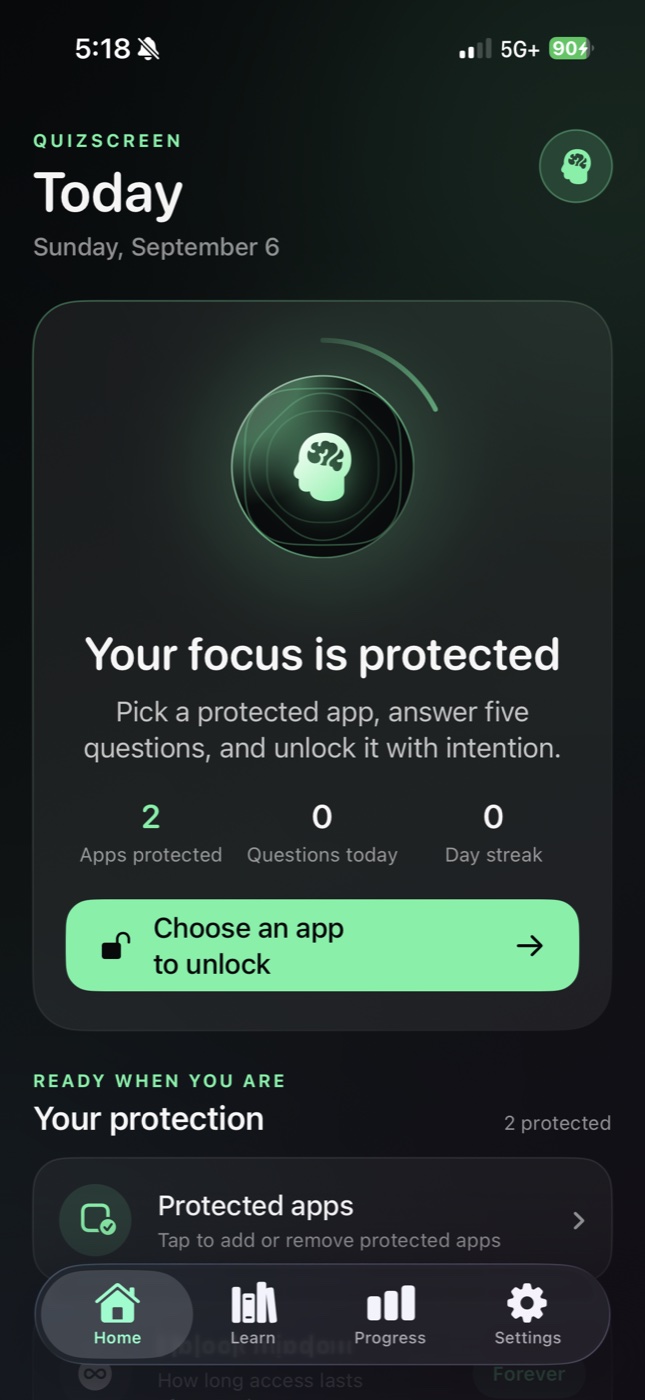
QuizScreen iOS App - Block apps and unlock with quiz questions

How QuizScreen Works

QuizScreen uses Apple's Screen Time API to block distracting apps. Unlock them by answering quiz questions—a simple flow that turns mindless scrolling into learning opportunities.

1

Pick Apps to Block

In App Management, use Apple's Screen Time picker to select which apps or categories you want to shield (block). Choose from social media, games, entertainment, or any distracting apps.

2

Blocked Apps Show a Shield

When you try to open a blocked app, iOS shows a custom QuizScreen shield message: "Please complete a quiz to unlock this app."

3

Start a Quiz to Unlock

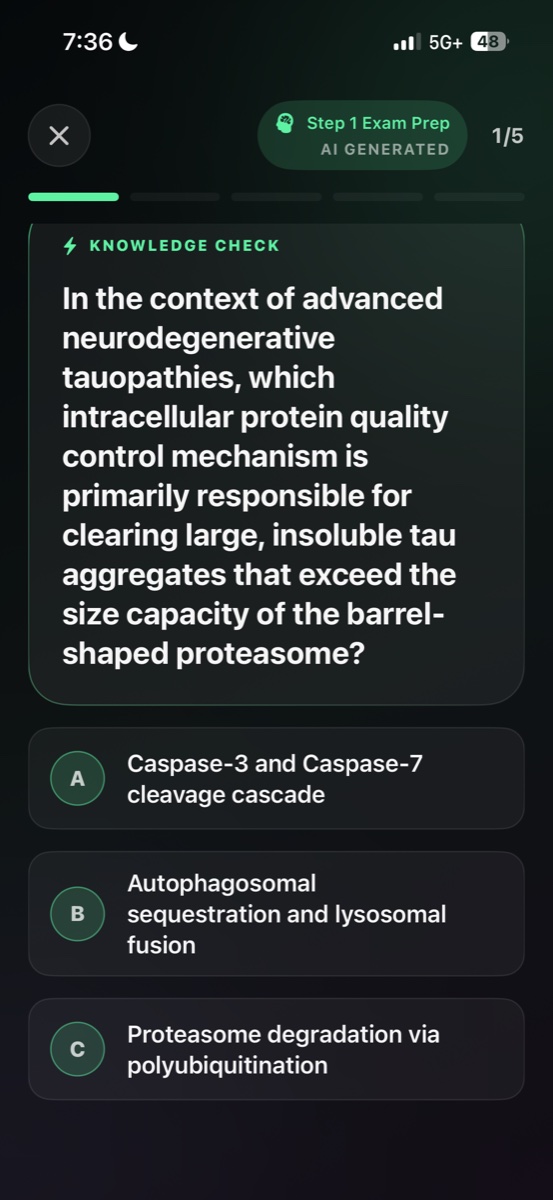
In the QuizScreen app, tap on the blocked app in your Blocked Apps list to launch a quiz. Questions are randomly selected from your active quiz topics.

4

Answer Correctly to Unlock

Complete the quiz by answering each question correctly. Once you finish, QuizScreen immediately removes that app from your blocked list.

5

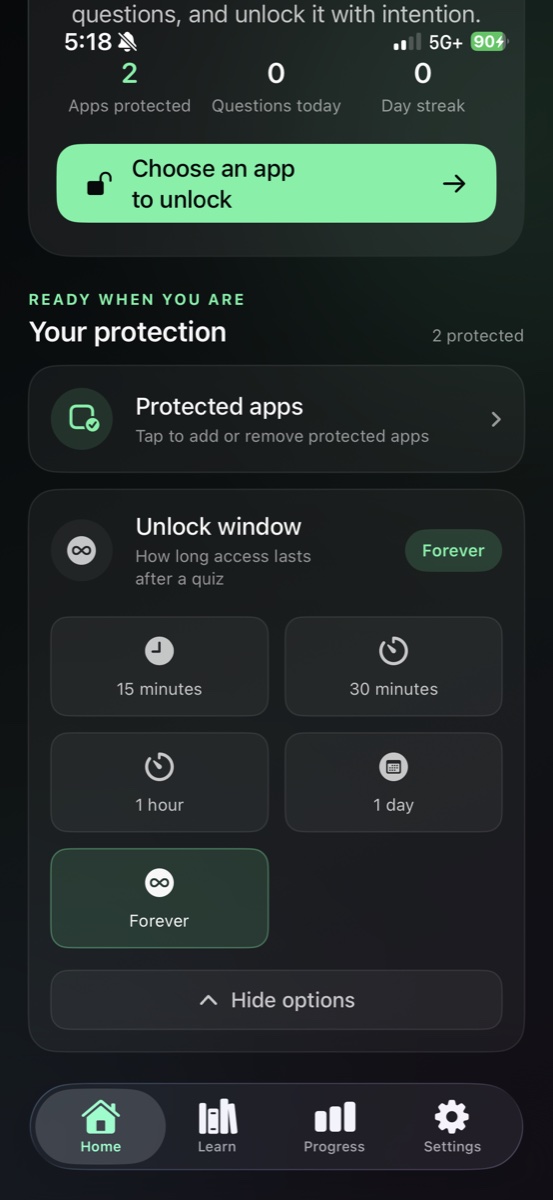
Choose Your Unlock Duration

Select how long to keep the app unlocked: 1 minute, 5 minutes, 10 minutes, 30 minutes, 1 hour, 1 day, or Forever. If not Forever, the app automatically re-blocks when time expires.

Quiz Topics Are Fully Customizable

QuizScreen lets you manage your quiz topics in Quiz Management. Toggle which topics are "active" and when you start an unlock quiz, it randomly picks one of your active topics to generate questions. Questions are AI-generated via OpenRouter when enabled, with fallback sample questions if AI is off or unavailable. Perfect for students studying specific subjects, professionals brushing up on industry knowledge, or anyone wanting to learn while they focus.

Why Students and Professionals Choose QuizScreen

QuizScreen transforms screen time management from punishment into opportunity. Block distractions, reinforce learning, and build better habits—all in one app.

Perfect for Students

Block social media during study sessions. Reinforce course material by answering subject-specific quiz questions to unlock distractions.

Build Focus Habits

Create intentional friction between you and distracting apps. The quiz requirement helps break automatic app-opening behavior.

Track Your Streaks

QuizScreen's Streaks section tracks quizzes completed, questions answered, daily streaks, achievements, and full session history.

Learn While You Unlock

Every unlock attempt becomes a micro-learning moment. Choose from 50+ quiz topics covering math, science, history, languages, and more.

Flexible Unlock Timers

Choose exactly how long to unlock: 1 minute for quick checks, 1 hour for extended breaks, or unlock forever when you need full access.

Gamified Progress

Earn achievements, build streaks, and watch your stats grow. Gamification makes focus feel rewarding, not restrictive.

Transform Distractions into Learning

Quiz Screen revolutionizes focus and productivity by turning screen time into learning time. Block distracting apps, answer educational quizzes to unlock them, and track your learning progress—all while building better digital habits that enhance both focus and knowledge.

Purpose-built icon

Smart App Blocking with Educational Unlock

Purpose-built icon

AI-Powered Quizzes Across All Subjects

Purpose-built icon

Track Learning Progress & Build Streaks

Advanced Learning Features for Deeper Engagement

Quiz Screen goes beyond simple app blocking with intelligent features that adapt to your learning style. From AI-powered question generation to detailed progress analytics, every aspect is designed to maximize your educational growth while maintaining focus.

AI-Powered Quiz Generation

Dynamic questions tailored to your skill level across 50+ subjects, from basic math to advanced quantum physics, generated fresh every time.

Adaptive Difficulty Levels

Six difficulty tiers from Easy to Expert Level ensure appropriate challenge. The AI adjusts question complexity based on your performance history.

Customizable Learning Paths

Create personalized quiz sets for specific goals - SAT prep, language learning, professional development, or academic subjects.

Seamless iOS Integration

Native Screen Time API integration ensures reliable app blocking while maintaining smooth iOS experience and battery efficiency.

Quiz Screen App Interface

Built on Apple Screen Time

QuizScreen uses Apple's official Screen Time API for reliable, secure app blocking. The same technology that powers iOS Screen Time settings.

Privacy-First Design

QuizScreen is designed to minimize data collection. Your quiz progress stays on your device.Read our privacy policy

Independent Development

QuizScreen is not affiliated with or endorsed by Apple Inc. Apple, Screen Time, and iOS are trademarks of Apple Inc.

Reviews

What people say about Quiz Screen

Adeen

@adeenrajpo36

Quiz Screen has completely changed my relationship with my phone! Instead of mindlessly scrolling Instagram, I'm now learning Spanish vocabulary every time I want to check social media. My streak is at 47 days!

Sameer

@samikha2233

As a software engineer, I was wasting too much time on YouTube during work breaks. Now Quiz Screen makes me solve coding challenges to unlock it. I've actually improved my algorithm knowledge while managing my screen time!

Katherine

@kkatherineeee

My daughter was struggling with math, so I set up Quiz Screen with math problems to unlock her gaming apps. Now she's voluntarily practicing multiplication tables and her grades have improved dramatically!

Alex

@alexar_box_

I'm studying for the MCAT and Quiz Screen is perfect for keeping me focused. Biology questions to unlock TikTok? Genius! I'm learning even during my 'break time' and my practice test scores are going up.

Juan

@hoouanito

Used to spend hours on Reddit and Twitter. Quiz Screen now quizzes me on history and science before I can access them. I've learned more random facts in the past month than I did in years of mindless browsing!

Jennifer

@jennifer2024onX

Quiz Screen helped me prepare for my nursing boards while managing my phone addiction. Medical terminology quizzes to unlock social apps? Perfect! Passed my NCLEX on the first try!

Rahul

@rahul_kathovar_

I'm learning French and Quiz Screen makes every phone distraction a learning opportunity. My vocabulary has exploded and I actually look forward to getting quiz questions now. C'est fantastique!

XinXin

@xin_xin_xin_1_1

My teenager and I both use Quiz Screen now - she gets math problems, I get business trivia. It's become a fun family challenge and we're both learning more while spending less time on mindless apps.

Abel

@theweekday43

Quiz Screen is brilliant! Geography questions to unlock Instagram, physics problems for YouTube. I've become the trivia champion at work and my focus has never been better. 10/10 recommend!

Quick Answers

QuizScreen at a Glance

Get quick answers to the most common questions about how QuizScreen works.

What is QuizScreen?

QuizScreen is an iOS focus app that blocks distracting apps using Apple Screen Time. To unlock a blocked app, you must answer quiz questions correctly.

How does QuizScreen block apps?

QuizScreen uses Apple's Screen Time API to shield (block) apps you select. When you try to open a blocked app, iOS shows a QuizScreen prompt instead.

Who is QuizScreen for?

QuizScreen is designed for students wanting to focus during study sessions, professionals reducing digital distractions, and anyone building better screen time habits.

Are quizzes AI-generated?

Yes. QuizScreen generates quiz questions using AI via OpenRouter when enabled. If AI is unavailable, the app uses fallback sample questions.

How long do apps stay unlocked?

You choose the unlock duration: 1 minute, 5 minutes, 10 minutes, 30 minutes, 1 hour, 1 day, or forever. Apps automatically re-block when the timer expires.

Does QuizScreen require a subscription?

QuizScreen offers a subscription for full access to all features. Free download is available with some features gated behind the subscription.

FAQ

Frequently Asked Questions

Find answers to common questions about QuizScreen—the iOS focus app that blocks distracting apps until you answer quiz questions correctly.

QuizScreen uses Apple's official Screen Time API to block apps. In the App Management section, you use Apple's Screen Time picker to select which apps or categories to shield. When you try to open a blocked app, iOS displays a custom QuizScreen shield message prompting you to complete a quiz.

Learning Resources

Master Focus & Study Techniques

Discover proven strategies to eliminate distractions, boost productivity, and transform your screen time into meaningful learning opportunities.

Ready to Turn Distractions Into Learning?

Join students and professionals who are building better focus habits with QuizScreen. Block distracting apps, answer quiz questions to unlock, and track your progress—all powered by Apple Screen Time.

Free to download · iOS 16.0+ · Subscription for full access